
Over the years, the Colourpin app has helped tens of thousands of users explore and scan colours using the Colourpin colour reader. However, we are now transitioning fully to NCS+, our modern platform for colour exploration and collaboration.
Below you’ll find key information about this transition, including important dates and what it means for you as a user.
What’s happening?
We are gradually retiring the Colourpin app and moving all future support and development to the NCS+ app.
Your Colourpin device will continue to work — this change only affects the app, not the hardware.
📅 Key dates
-
May 14, 2024 – The Colourpin app received its final update
-
September 30, 2025 – End of technical support for the Colourpin app
-
January 31, 2025 – The Colourpin app will be removed from the App Store and Google Play
After January 31st, the app will no longer be available for download or reinstallation. If it’s still installed on your device, you may continue using it, but no updates or support will be provided.
What should I do?
We recommend switching to the NCS+ app, which supports all Colourpin devices and provides a more modern and feature-rich experience.
With NCS+ you can:
-
Scan and save colours with your Colourpin device
-
Search for colours using your phone camera or images
-
Explore smart colour combinations powered by the Natural Colour System
-
Create and collaborate on moodboards
-
Receive regular updates and support
Download NCS+ for Mobile now
How do I transfer my data?
You can easily migrate your data from the Colourpin app to NCS+ by visiting https://app.ncscolour.com/settings/colourpin-migration.
You can also access the migration guide at any time by:
-
Click on your user avatar in the top right corner of NCS+
-
Click on Settings
- Click on Colourpin App migration in the bottom right section.
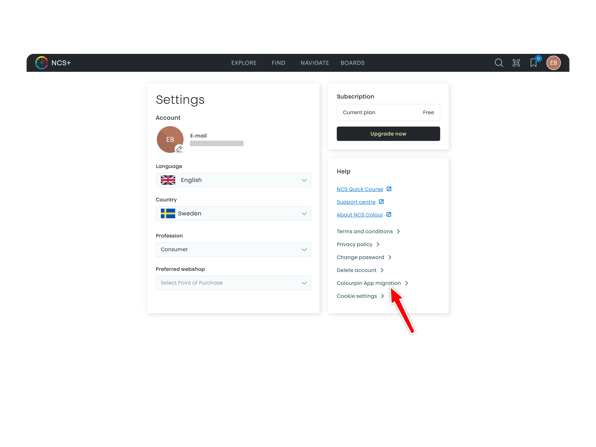
Note: You can only migrate data using the same email address that you used in the Colourpin app. If you need help changing your email address in NCS+, reach out to our support team.
Frequently Asked Questions
Will my Colourpin device still work?
Yes, all hardware products supported by the Colourpin app are fully supported in NCS+.
Can I still use the Colourpin app after January 31, 2025?
If the app is still installed on your device, it may continue to function. However, it will not be possible to download or reinstall it, and no further support will be provided.
Is my data safe during the migration?
Yes. The migration process is fully compliant with GDPR and your data is handled securely.
When you choose to migrate your saved content from the Colourpin app to the NCS+ app, a copy of your saved folders in the Colourpin app will be securely transferred from Variable Technologies Inc. to NCS Colour AB.
After the migration:
-
Variable Technologies Inc. will remain the data controller of your data within the legacy Colourpin app.
-
NCS Colour AB will become a separate data controller of the migrated data within the NCS+ app.
Both parties will process your data in accordance with applicable data protection regulations, including the GDPR. You can read more in the respective privacy policies below. You may safely delete your account from within the Colourpin app via Settings -> Manage Account -> Delete My Account after you have migrated the content.
Note: You will need to have your email address confirmed in NCS+ in order to start the migration.
What data can be transferred?
The following can be migrated:
-
Saved folders
-
Notes assigned to saved colours
-
Uploaded images
-
NCS standard colours
-
Scans saved to your folders
- RAL colours will be converted to their closest NCS standard with a note telling you what RAL colour was converted
These will appear as Moodboards inside NCS+.
What data cannot be transferred?
The following data will not be migrated:
-
Scan history (i.e. scans that have not been saved to Colourpin Folders)
-
Compare history
- Custom colours from other non-NCS standard colour ranges
Why does RAL colours get translated to NCS colours during the migration?
Unfortunately, we do not have a license agreement with RAL to display their colours within NCS+ as actual colour cards (except for in the Convert feature). In order to maintain the integrity of your folders during the migration, we have decided to convert the colours automatically but to leave a note on each converted colour indicating which RAL code it came from.
Need help?
If you need assistance or run into issues, please contact our support team at: